
Nearby alerts
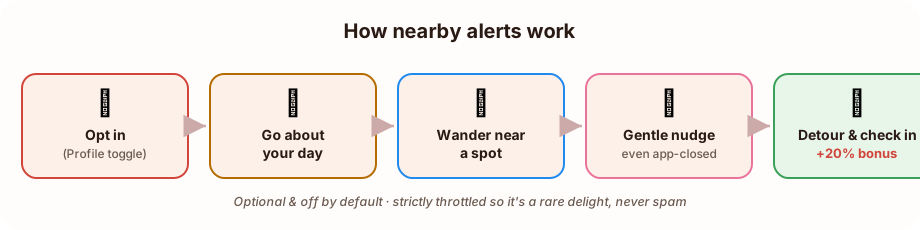
Nearby alerts turn everyday life into passive treasure-hunting. With it switched on, Locatour can give you a gentle nudge when you happen to wander near a spot you haven’t found yet, even when the app is closed and tucked away in your pocket. +20% pts
It’s completely optional and off by default. This page explains exactly what it does, the bonus you get for using it, and how we keep it private and rare.
What it does
Section titled “What it does”You’re going about your day (walking to lunch, driving home a new way) and your phone quietly buzzes:
- 🔍 “Closing in…” when you’re getting near a hidden spot you haven’t unlocked or found yet. Hidden spots ping from a little further out, to build a bit of anticipation as you approach.
- 📍 “Spot nearby!” when you’re close to a spot that’s already open to you.
Tap the notification and Locatour opens right to the place, so you can decide to make the detour and check in. The whole idea is ambient discovery: finding places you’d never have gone looking for, simply because you happened to pass by.
The bonus: +20% points, always on
Section titled “The bonus: +20% points, always on”While nearby alerts are switched on, you earn a permanent +20% points bonus on every single check-in, not just the ones you discover through an alert. It shows up as a “+20% pts” badge on the toggle.
Even better, it stacks with the big first-find discovery bonus you get for being among the first to reach a spot. Keeping nearby alerts on is the single best way to maximise your points over time.
A rare delight, never spam
Section titled “A rare delight, never spam”Nearby alerts are designed to feel like a treat, not a nuisance. Locatour holds them back with strict limits:
- At most a few a day: a small daily cap means you’ll never be flooded.
- Never overnight: alerts are silenced through the evening and night (roughly 9pm to 8am, your local time), so your phone stays quiet while you rest.
- No repeats: once you’ve been alerted to a spot, Locatour won’t ping you about that same spot again for about a month.
The result: an occasional, welcome surprise, not a buzzing pocket.
Private by design
Section titled “Private by design”This is the important part. When nearby alerts are on, your phone checks your rough position against the spots near you on the device, and that’s it.
- Your location is only ever matched against nearby Locatour spots.
- We don’t record a continuous trail of where you go.
- We don’t share or sell your location.
- It’s fully reversible: turn it off any time and background location use stops immediately.
For the full detail, see Your data & security and the Privacy Policy.
Light on your battery
Section titled “Light on your battery”Nearby alerts don’t constantly track your GPS (that would drain your phone). Instead they use your phone’s built-in, low-power location features, which only wake up when you’ve actually moved a meaningful distance. It’s designed to sip battery, not gulp it.
Turning it on (and off)
Section titled “Turning it on (and off)”-
Go to Profile → Overview and find the Nearby alerts toggle (with its “+20% pts” badge).
-
Tap it on. Locatour first shows you a plain-language explanation of what background location does, the points bonus, and the privacy promises above, so you can make an informed choice before any system permission appears.
-
After you accept, your phone asks for permission. On many Android phones, you’ll be taken to Settings to choose “Allow all the time” for location: this is the system’s own step for background location, and it’s required for alerts to work while the app is closed.
-
To turn it off, flip the toggle back any time, or change the location permission in your device settings. Background location use stops right away.
In short
Section titled “In short”Switch it on for a steady +20% points and the occasional happy surprise of stumbling onto a new place. Leave it off and Locatour only ever uses your location when you actively check in. Either way, the choice is yours, and you can change your mind whenever you like.